How to Get Your OpenAI API Key - A Complete Guide
Getting started with OpenAI's API is the gateway to using powerful models like GPT-5/x and o1/x. Whether you're building an AI application or using a tool like Cosmo Studio, obtainining your API key is a simple process. In this guide, we'll walk you through the exact steps to get your OpenAI API key.
🌟 What Is the OpenAI API?
The OpenAI API provides access to state-of-the-art AI models developed by OpenAI. With this API, you can:
- Generate high-quality text and code
- Power intelligent chatbots and assistants
- Perform complex reasoning and data analysis
- Access vision and audio capabilities
To use these models, you'll need an API key — a secure token that identifies your account and tracks your usage.
📋 Prerequisites
Before we begin, make sure you have:
- An OpenAI account (if you don't have one, sign up at platform.openai.com)
- (optional) A valid payment method or credits on your OpenAI account (OpenAI uses a prepaid billing system)
🚀 Step-by-Step Guide to Getting Your OpenAI API Key
Step 1: Navigate to the OpenAI API Keys Page
Start by visiting the official OpenAI API platform. Directly go to the API keys section:
👉 https://platform.openai.com/api-keys
This page is where you manage all your secret keys.
Step 2: Create Your Secret Key
Once you're on the API keys page, look for the section titled "API keys".
Click on the "Create new secret key" button as shown below:

A dialog box will appear prompting you to configure your new API key.
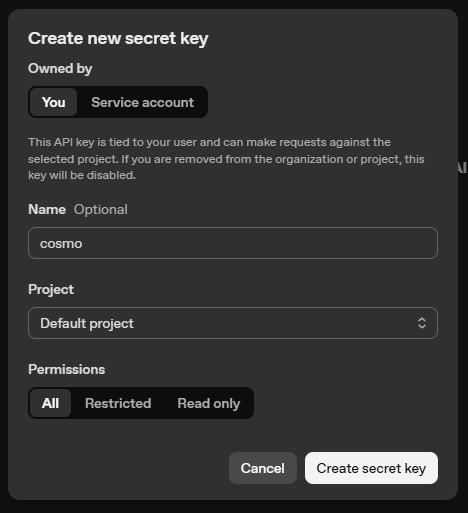
In this dialog, you can:
- Owned by: Select "You" (default) or a Service Account if applicable.
- Name (Optional): Give your key a descriptive name like "cosmo" or "Production".
- Project: Choose the project this key should be tied to (usually "Default project").
- Permissions: Set this to "All" for full access to models, or "Restricted" if you want to limit scope.
Click the "Create secret key" button at the bottom right to generate your key.
Step 3: Copy and Secure Your API Key
After clicking create, a final popup will appear showing your unique secret key.
IMPORTANT: Copy this key immediately (using the copy icon) and store it in a safe place. OpenAI will not show this key to you again for security reasons. If you lose it, you will have to create a new one.
💡 Pro Tip: Unlike some other providers, OpenAI requires you to have a positive credit balance or a linked payment method for your API keys to work. If you receive a "quota exceeded" error, check your Billing dashboard.
⚠️ Security Warning: Your API key is like a password. Never share it, post it on social media, or commit it to GitHub. If a key is compromised, someone else could use your account credits.
🔌 Integrating Your API Key into Cosmo Studio
If you're using Cosmo Studio to interact with AI, here's how to plug in your new key:
- Open Cosmo Studio and go to Settings.
- Click on "Add Provider".
- Select OpenAI from the list.
- Paste your secret key into the API Key field.
- Select the models you'd like to use (e.g.,
gpt-4o,o1-preview). - Click Save.
Now you're ready to chat with OpenAI's most powerful models!
🛡️ Best Practices for API Key Security
To keep your account safe:
- Use Usage Limits: Set hard and soft limits in your Billing settings to avoid unexpected costs.
- Rotate Keys: Regularly delete old keys and create new ones.
- Never hardcode: Use environment variables (
.envfiles) when developing applications. - Project Scoped Keys: Use project-specific keys to limit the scope of access if one key is exposed.
📚 Additional Resources
🙌 Conclusion
Obtaining your OpenAI API key is a quick process that unlocks a world of AI possibilities. By following these steps, you've taken the first step toward building or using next-generation AI tools.
If you found this guide helpful, check out our other tutorials on the blog. Happy building! 🚀