
2 posts tagged with "tutorial"

View All Tags

How to Get Your OpenAI API Key - A Complete Guide

ยท 4 min read
admin
Cosmo Team

Getting started with OpenAI's API is the gateway to using powerful models like GPT-5/x and o1/x. Whether you're building an AI application or using a tool like Cosmo Studio, obtainining your API key is a simple process. In this guide, we'll walk you through the exact steps to get your OpenAI API key.


๐ŸŒŸ What Is the OpenAI API?โ€‹

The OpenAI API provides access to state-of-the-art AI models developed by OpenAI. With this API, you can:

  • Generate high-quality text and code
  • Power intelligent chatbots and assistants
  • Perform complex reasoning and data analysis
  • Access vision and audio capabilities

To use these models, you'll need an API key โ€” a secure token that identifies your account and tracks your usage.


๐Ÿ“‹ Prerequisitesโ€‹

Before we begin, make sure you have:

  • An OpenAI account (if you don't have one, sign up at platform.openai.com)
  • (optional) A valid payment method or credits on your OpenAI account (OpenAI uses a prepaid billing system)

๐Ÿš€ Step-by-Step Guide to Getting Your OpenAI API Keyโ€‹

Step 1: Navigate to the OpenAI API Keys Pageโ€‹

Start by visiting the official OpenAI API platform. Directly go to the API keys section:

๐Ÿ‘‰ https://platform.openai.com/api-keys

This page is where you manage all your secret keys.
How to Get Your Gemini API Key - A Complete Guide

ยท 5 min read
admin
Cosmo Team

Getting started with Google's Gemini API is straightforward, but if you're new to the platform, navigating the setup process can feel a bit overwhelming. In this guide, we'll walk you through every step of obtaining your Gemini API key and integrating it into your application.

Whether you're building an AI-powered chatbot, experimenting with generative AI, or integrating Gemini into your workflow, this tutorial will get you up and running in minutes.


๐ŸŒŸ What Is the Gemini API?โ€‹

The Gemini API provides access to Google's powerful family of generative AI models. With Gemini, you can:

  • Generate human-like text responses
  • Build conversational AI applications
  • Create content, summarize documents, and more
  • Leverage multimodal capabilities (text, images, and beyond)

To use the Gemini API, you'll need an API key โ€” a unique identifier that authenticates your requests to Google's servers.


๐Ÿ“‹ Prerequisitesโ€‹

Before we begin, make sure you have:


๐Ÿš€ Step-by-Step Guide to Getting Your Gemini API Keyโ€‹

Step 1: Navigate to the Gemini API Documentationโ€‹

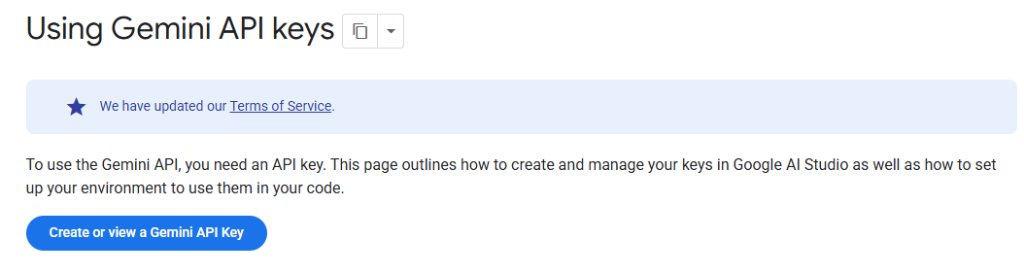
Start by visiting the official Gemini API documentation at:

๐Ÿ‘‰ https://ai.google.dev/gemini-api/docs/api-key

This page provides comprehensive information about creating and managing your API keys, as well as best practices for securing them.

Gemini API Key Documentation

You'll see a blue button labeled "Create or view a Gemini API Key" โ€” this is your gateway to Google AI Studio.